Blender 5.2 LTS: Node-Based Physics, Audio-Reactive Geometry and What It Means for Creative Coders
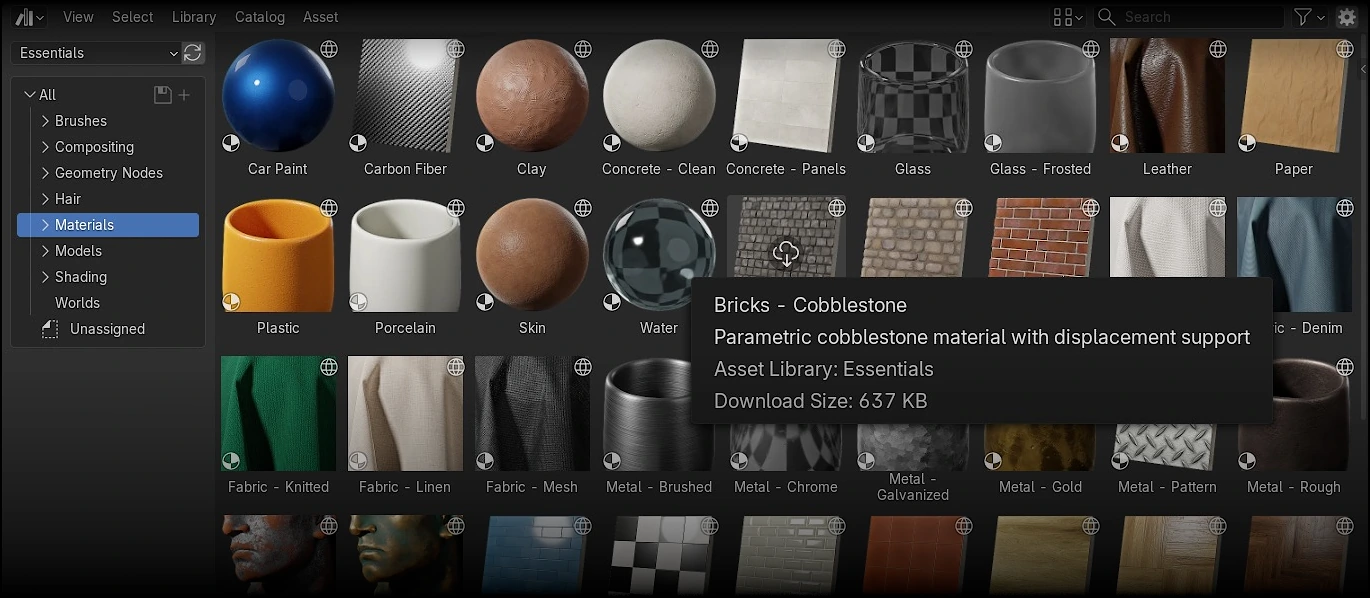 Screenshot: Blender 5.2 LTS Asset Browser with the Online Essentials library (official screenshot from blender.org, licensed under CC BY-SA)
Blender 5.2 LTS, released July 14, 2026, is the most significant update for creative coders and procedural artists since the introduction of Geometry Nodes. The release brings node-based cloth and hair physics driven by a new XPBD solver, audio-reactive animation through the Sample Sound Frequencies node, online asset libraries that keep the download size small while expanding available content, and a major EEVEE performance overhaul. For anyone teaching 3D art, building educational simulations, or working in procedural content creation, these changes close several long-standing gaps between Blender and commercial alternatives.
In Brief
- Node-based cloth and hair physics powered by a new XPBD solver bring procedural simulation directly into Geometry Nodes
- The Sample Sound Frequencies node lets you drive animations and simulations from imported audio files — audio-reactive 3D content without scripting
- Online asset libraries add dozens of new parametric materials, HDR worlds, and Geometry Nodes setups without increasing Blender’s install size
- EEVEE receives a 2x speed-up in instance-heavy scenes, better screen-space raytracing, and improved cross-platform rendering consistency
- The Compositor gains 35 new nodes, GPU-accelerated modifiers, and direct integration with the Video Sequencer timeline
- Blender 5.2 is an LTS release supported with fixes until July 2028
- The software remains free and open-source under GNU GPL
Node-Based Physics: The Headline Feature
The most consequential addition in Blender 5.2 is the new node-based physics system. Previously, cloth and hair simulation in Blender required navigating separate physics panels with fixed parameter sets. You could adjust stiffness, damping, and a handful of other properties, but you could not build custom simulation logic without writing Python scripts.
The new system changes that. Cloth and hair dynamics are now implemented as node-based modifiers built on the new XPBD (Extended Position-Based Dynamics) solver node. The built-in node groups provide declarative, use-case-specific setups — but advanced users can edit constraints, modify the node tree, or build entirely new simulation systems from scratch.
What makes this significant for creative coders:
Procedural control over simulation behavior. Instead of choosing between a fixed set of presets, you can build simulation logic using nodes — adding custom forces, tag-based collision filtering, and closure-based custom effectors. The tag and filter system lets you specify which geometries each effector affects, which is the kind of fine-grained control that game engines like Unity offer through their component system.
Audio-reactive simulation. The Sample Sound Frequencies node, paired with the new Sound socket, lets you load audio files directly into a Geometry Nodes tree and use frequency data to drive any parameter — cloth movement, particle emission, mesh deformation. This is not a niche feature. It opens up an entire category of music visualization and audio-reactive 3D art that previously required custom Python scripting or external tools like TouchDesigner.
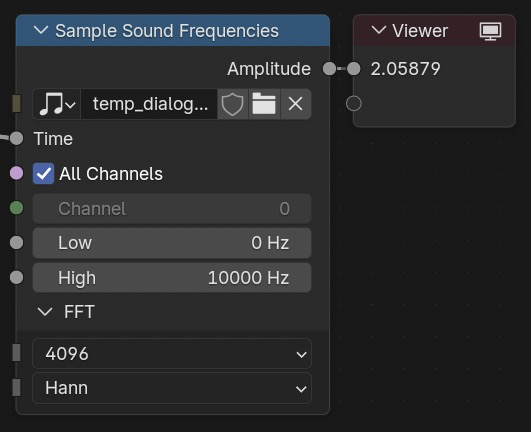 Screenshot: The Sample Sound Frequencies node in Blender 5.2 LTS, enabling audio-reactive animations within Geometry Nodes (official screenshot from blender.org, licensed under CC BY-SA)
Why This Matters for Creative Coders and Educators
Blender’s node-based physics arrives at a time when creative coding is expanding as a discipline. Tools like p5.js, Processing, TouchDesigner, and Houdini have long offered procedural ways to generate visuals, but each occupies a different niche. Houdini is the industry standard for procedural effects in film and VFX, but its licensing model — starting around $270 per year for the Indie tier — puts it out of reach for many independent creators and most educational programs. TouchDesigner is powerful for real-time interactive installations but is oriented toward live performance rather than rendered animation.
Blender’s advantage is that it provides the full pipeline — modeling, animation, simulation, rendering, compositing, and video editing — in a single free application. With 5.2 LTS, the simulation piece becomes procedural and node-driven, meaning you can build complex physical behaviors without leaving the Geometry Nodes environment or writing Python.
For educators, this matters in several specific ways:
Physics becomes visual. Teaching cloth simulation through nodes makes the underlying mathematics tangible. Students can see how a force node connects to a geometry input, how collision detection works, and how changing a single parameter affects the entire system. This is the same pedagogical advantage that visual programming environments like Scratch or MIT App Inventor offer for coding — making abstract logic visible.
Audio-reactive content is now accessible. The Sample Sound Frequencies node removes a significant barrier. Previously, creating audio-reactive 3D content in Blender required Python scripting — knowledge that many art and design students do not have. Now, a student can load an audio file, connect frequency data to a deformation parameter, and see the result immediately. This is the kind of immediate visual feedback that makes programming engaging for students — the same principle that makes GDScript effective in Godot for classroom use.
Cross-disciplinary projects become feasible. A single Blender project can now combine 3D modeling, physics simulation, audio-driven animation, and rendered output. For STEAM programs that want to integrate art, physics, and computer science in a single project, this reduces the toolchain overhead. Students learn one environment rather than three.
Online Asset Libraries: Smaller Downloads, More Content
Blender 5.2 introduces online asset libraries, and this is more practically useful than it might sound. Previous Blender releases shipped with a growing collection of built-in materials, HDRIs, and node groups. Each release made the download larger. Blender 5.2 reverses this by moving the expanded asset collection online. The Essentials library now includes dozens of new parametric materials, compositing effects, HDR world backgrounds, Geometry Nodes setups, and 19 new Grease Pencil brushes — but none of it ships in the installer. Assets are fetched on demand.
For educational settings in Pakistan and similar markets, this is the right tradeoff. A school downloading Blender for the first time gets a smaller installer. Students working on projects can pull specific assets as needed. And importantly, the online library system supports self-hosted repositories — a school or organization can host its own asset library on a local server, making it available to students without internet access.
The preference panel lets you add any URL as a remote asset library. Smart indexing handles thousands of assets without performance issues, and a single click updates all assets from a given source. For EdTech product teams, this architecture is worth studying: it separates the core application from the content library, reducing friction for new users while giving organizations control over their own asset distribution.
EEVEE: Performance That Changes Workflows
EEVEE, Blender’s real-time render engine, received a substantial overhaul in 5.2. The headline number is a 2x speed-up in instance-heavy scenes — the kind of scenes that educational simulations, crowd animations, and environment renders tend to generate. But the practical changes go beyond benchmarks.
Screen-space raytracing has been overhauled, fixing long-standing issues with light leaking and shadow accuracy. The new Backface option under Screen Tracing gives users explicit control over how back-face intersections are handled — a technical setting, but one that directly addresses a common visual artifact that has frustrated EEVEE users since the EEVEE Next transition.
For classrooms and maker spaces running on modest hardware — integrated graphics, older GPUs, shared lab machines — EEVEE is the path to real-time feedback. Every performance improvement in EEVEE directly translates to a better experience for students who cannot afford dedicated GPU workstations. In Pakistan, where many school computer labs use machines with integrated Intel or entry-level graphics, this is not a minor consideration. It is the difference between Blender being usable or not.
The Compositor and Video Sequencer Integration
Blender 5.2 adds 35 new Compositor nodes and introduces a Compositor effect strip that runs node trees directly on the Video Sequencer timeline. This effectively turns the compositor into a real-time effects engine for video editing within Blender.
Six new socket types (Matrix, Rotation, String, Object, Font, and Integer Vector) bring the Compositor closer to the expressiveness of Geometry Nodes. Compositor gizmos now support auto-keying, meaning you can animate compositing setups by directly manipulating gizmos in the viewport — a workflow that was previously manual and tedious.
For creators who produce educational video content, tutorial videos, or animated explainers, this integration means the full post-production pipeline — from 3D rendering to color grading to text overlays to final export — can live in a single Blender file. That is a genuine workflow advantage over managing separate After Effects, Premiere, and DaVinci Resolve projects, particularly for solo creators and small teams.
What This Means for Pakistan and Emerging Markets
Blender’s relevance in Pakistan and similar markets is structural. The software is free, runs on modest hardware, and does not require an internet connection for core functionality. These properties matter more in contexts where software licensing costs are a real barrier, where school hardware is shared and aging, and where bandwidth is inconsistent.
The 5.2 LTS release strengthens this position. The two-year support window means schools can standardize on 5.2 through July 2028 without worrying about mandatory upgrades. The smaller download size helps with bandwidth constraints. The online asset library can be mirrored on a local server. And the EEVEE performance gains make the software more usable on the kind of hardware that Pakistani schools actually have.
For LearnOBots and similar STEAM education programs, Blender offers a different value proposition than game engines. Where Godot teaches programming through interactive game development, Blender teaches 3D modeling, procedural thinking, and visual design. The two tools complement each other — a student who learns GDScript in Godot and Geometry Nodes in Blender has a foundation that spans both code-driven and visual-driven creative technology.
For product teams building educational simulations or interactive learning content, Blender’s node-based physics opens up possibilities that were previously locked behind Houdini’s pricing. A team building a physics-based educational tool can now prototype procedural simulations in Blender’s Geometry Nodes using the XPBD solver, render the results, and iterate — all within a free, open-source environment.
Product Builder’s Perspective
From a product-building perspective, Blender 5.2 LTS is interesting for reasons beyond its feature list. It demonstrates a product strategy that several software projects could learn from:
Separate the core from the content. By moving asset libraries online, Blender reduced its install footprint while expanding available content. This is the same architectural principle that progressive web applications use — ship a small core, load features on demand. For EdTech products, this approach reduces the barrier to entry for new users while giving organizations the ability to host and curate their own content.
Node graphs as a universal interface. Blender now uses node-based systems for geometry, physics, compositing, and shader creation. The same interaction paradigm — connect inputs to outputs, build complex behavior from simple parts — applies across domains. This is a design philosophy that reduces cognitive load: once you understand Geometry Nodes, you understand the Compositor. For product designers building tools for non-technical users, the lesson is that a consistent visual programming paradigm can make complex functionality approachable.
LTS as a commitment. In a market where software updates are increasingly frequent and disruptive, a two-year LTS release signals stability. For schools, this means curriculum developed today will work tomorrow. For organizations, it means training investment is protected. This is the same logic that makes Prusa’s upgrade paths appealing to makers — the company commits to not making your hardware obsolete. Software LTS releases serve the same function for workflows.
What to Watch Next
- Blender 5.3 is the next planned feature release, expected in late 2026 based on the typical 4-month release cycle
- Extensions platform growth — over 1,100 free add-ons are now available, making Blender’s plugin ecosystem one of the largest in creative software
- VR Location Scouting — the new VR feature in 5.2 lets you scout camera positions in a 3D scene using a VR headset, which could be relevant for educational VR projects
- glTF export improvements — Point Cloud support, meshopt compression, and iridescence materials in the glTF exporter improve interoperability with web-based 3D viewers and game engines
- OpenUSD support continues to mature, with better color space handling and memory-efficient export options — relevant for any team integrating Blender into a pipeline with other industry tools
Conclusion
Blender 5.2 LTS is not a revolutionary release. It is an evolutionary one that happens to land several features creative coders have wanted for years. Node-based physics brings procedural simulation into the same environment as procedural geometry. Audio-reactive nodes remove a scripting barrier for a whole category of work. Online asset libraries solve a distribution problem without creating a new one. And EEVEE’s performance gains make the real-time render engine more viable on the hardware that most students and independent creators actually use.
For educators, the LTS label means this is the version to build curriculum around. For product teams, the node-based physics system is worth evaluating as a prototyping tool. For independent creators, audio-reactive Geometry Nodes alone justify the upgrade.
If you are currently using Blender 4.x, 5.2 LTS is the right time to move. If you are evaluating Blender against Houdini for procedural work, the gap is narrower than it has ever been — and the price difference is still infinite.
What would you build with audio-reactive physics nodes?
Sources
- Blender 5.2 LTS Release Notes — Blender Foundation, July 14, 2026
- Blender License — Blender Foundation (GNU GPL)
- Blender Website Content License — Blender Foundation (CC BY-SA)
- Blender Extensions Platform — Blender Foundation
- Blender 5.2 LTS Demo Files — Blender Foundation