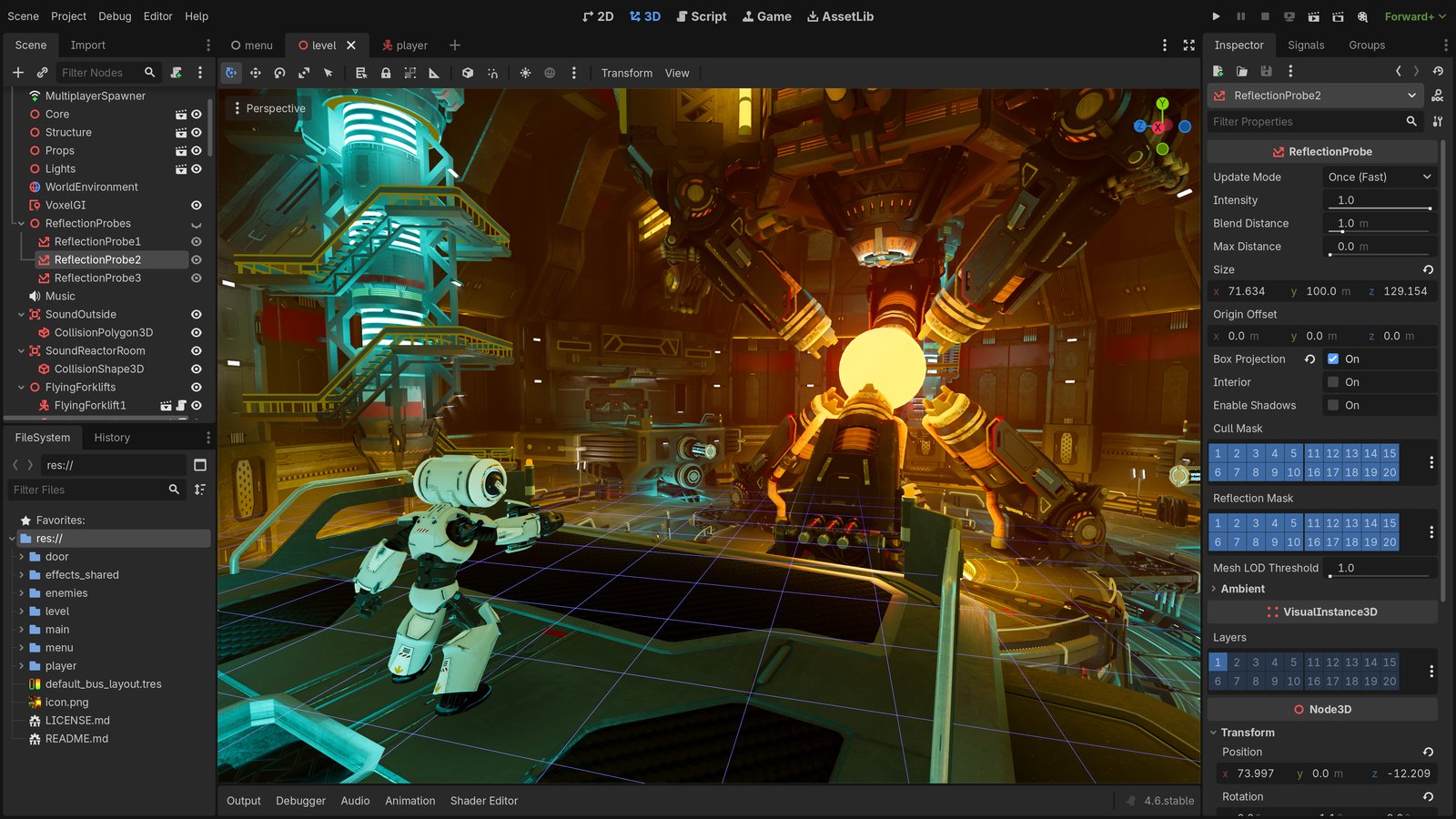
 Screenshot: Godot Engine editor interface (official screenshot from the Godot design repository, licensed under CC BY 4.0)
Godot, the open-source game engine licensed under MIT, has grown from a niche project into a serious competitor to Unity and Unreal — and for STEAM educators, it may now be the best choice available. With Godot 4.7 stable released in June 2026, version 4.8 already in active development, and a community of over 115,000 GitHub stars, the engine offers a combination of zero-cost licensing, a built-in scripting language, and a feature set that rivals proprietary tools — without the pricing surprises that have driven indie developers and educators away from Unity.
In Brief
- Godot is fully free and MIT-licensed — no runtime fees, no revenue thresholds, no subscription tiers
- Godot 4.7 stable shipped June 18, 2026, with 4.7.1 following on July 14; Godot 4.8 is already in dev snapshots
- The engine has over 115,000 GitHub stars, making it one of the most popular open-source projects in the world
- Unity’s September 2023 “runtime fee” announcement pushed many indie developers and educators toward Godot
- Godot’s GDScript is beginner-friendly and Python-adjacent, making it well-suited for classroom adoption
- The Godot Foundation’s June 2026 contribution policy update addresses AI-generated code — a concern directly relevant to CS educators
What Makes Godot Different from Unity and Unreal
Most game engines used in education fall into one of two categories: powerful but expensive (Unity, Unreal Engine), or free but limited (Scratch, older versions of Stencyl). Godot breaks this tradeoff.
Licensing is the biggest differentiator. Godot is released under the MIT license, which means anyone can use it, modify it, redistribute it, or even fork it — commercially or non-commercially — without paying royalties or asking permission. There are no install-count fees, no revenue thresholds, and no “Personal vs. Pro” tiers. For a school running 30 machines in a computer lab, this matters: no license management, no per-seat costs, no risk of audit.
The contrast with Unity is stark. On September 12, 2023, Unity announced a “runtime fee” — a per-installation charge that would apply once a game crossed certain revenue and install thresholds. According to Wikipedia’s summary of the controversy, the announcement faced immediate backlash from indie developers, with studios like Innersloth ( makers of Among Us) and Mega Crit ( makers of Slay the Spire) publicly committing to switch engines. Mega Crit specifically named Godot as their choice for Slay the Spire 2. Unity revised the terms on September 22, 2023, but the damage to trust was lasting. For educators, the episode raised a practical question: how can you build a curriculum around a tool whose licensing terms might change mid-semester?
Unreal Engine remains free until a project earns $1 million in revenue, after which Epic takes a 5% royalty. That model is generous for students and small studios, but the engine itself is heavyweight — the installed size, hardware requirements, and complexity of Unreal’s C++ and Blueprint systems make it impractical for most K-12 settings and many introductory university courses.
Godot sits in a different position entirely. The editor is a single executable under 100 MB. It runs on Windows, macOS, Linux, and from a web browser. Projects can be exported to desktop, mobile, web, and consoles (with publisher permission). There is no account to create, no license to accept, and no phone-home mechanism.
Godot 4.7 and 4.8: What Is New and Why It Matters for Education
Godot’s development pace has accelerated dramatically. The 4.7 stable release shipped on June 18, 2026, with a maintenance update (4.7.1) following on July 14. Combined, these releases have been downloaded over 700,000 times from GitHub alone.
The 4.8 dev 3 snapshot, published August 7, 2026, shows where the engine is heading. Several features are particularly relevant for educational use:
Docked game view by default. Previously, running a project from the editor opened a separate window. Now, the game view embeds directly within the editor by default — a small change that makes a large difference in classroom settings where students are working on laptops with limited screen space.
GDScript error underlines. Godot’s built-in scripting language now underlines the specific portion of code causing a warning or error, rather than highlighting the entire line. For beginners learning to debug, this precision helps them understand what went wrong, not just where.
Touch support for CodeEdit. For schools using tablets or touchscreen laptops — common in Pakistani classrooms and many developing-country education settings — the code editor now has proper touch support. This addresses a real gap: previously, editing code on a tablet required a Bluetooth keyboard or a different tool entirely.
Pseudolocalization preview. A built-in tool that simulates how text will look when translated to other languages. For international education programs, this makes localization planning visible early in development — useful for any program building educational games for non-English-speaking audiences.
FileSystem improvements. Glob-based searching and zoom controls make the editor more approachable for new users navigating a project for the first time.
GDScript: A Learning Language That Scales
One of Godot’s most education-friendly features is GDScript, a Python-adjacent language designed specifically for the engine. For educators comparing Godot to Unity (which uses C#) or Unreal (C++ and Blueprints), GDScript offers a distinct advantage: it is readable enough for beginners while being capable enough for production games.
The syntax will be immediately familiar to anyone who has taught Python:
extends RigidBody2D

func _ready():
    var tween = create_tween()
    tween.tween_property(self, "modulate", Color.RED, 1.0)
    tween.tween_callback(queue_free)
For STEAM programs that already teach Python — and many do, given Python’s dominance in data science and machine learning — GDScript provides a natural transition into game development without asking students to learn an entirely new syntax. This is not a trivial benefit. As noted in a July 2026 blog post by educator Charlie Meyer, the key to motivating students to write code is giving them abstractions that produce tangible, visual results. Meyer’s “PaintBrush” Python class — which lets students draw with code — demonstrates the same principle that makes GDScript effective: when code produces something you can see, engagement follows.
The Godot 4.7 release also added AwaitTweener — the ability to chain animations that wait for specific signals — and optimized animation systems that make it easier to build interactive, visually rich experiences without writing complex state machines.
The AI Contribution Policy: Why It Matters for CS Education
In June 2026, the Godot Foundation published updated contribution policies that directly address AI-generated code. The policy states that the project will enforce stricter rules on AI contributions because “reviewing PRs is already tedious work, but it is rewarding because reviewers generally feel that their efforts are contributing to educating a new contributor. If your feedback on PRs is just being absorbed by a machine and not going towards mentoring a potential future maintainer, it becomes much harder to justify spending your free time on PR review.”
This position is worth examining from an education perspective. The Godot Foundation is explicitly naming a tension that every CS educator faces in 2026: AI can generate code, but the learning happens in the struggle of writing, debugging, and understanding. When an AI agent submits a pull request, no one learns — not the agent, and not the reviewer. The same logic applies in a classroom. A student who pastes AI-generated code without understanding it has produced output, but not learning. This is a challenge Shamyl discussed at the AI Summit Islamabad in the context of AI-powered assessment — the tool should support learning, not replace it.
The policy does not ban AI assistance outright. Instead, it requires that contributors take responsibility for their code and be “able and willing to fix it when needed.” This is a reasonable middle ground — and it mirrors what many educators are arriving at independently: AI as a tutor or reference is fine; AI as a replacement for student effort is not.
Godot for Educational Simulators and Interactive Content
Game engines are not only for games. For anyone building educational simulations, interactive lessons, or virtual labs, Godot offers a compelling platform.
The 2D and 3D rendering pipelines support the kinds of visual content that make educational tools engaging. The physics engine (with Jolt Physics integration in 4.7+) handles simulations that need real-world behavior. The animation system supports everything from character animation to procedural motion. And because Godot projects can be exported to the web, interactive content built in Godot can be embedded in learning management systems or accessed from any browser.
For product teams building EdTech tools, Godot’s open-source nature means you are never at the mercy of a single vendor. If a feature is missing, you can build it. If the engine stops meeting your needs, you can fork it. If the project disappears tomorrow (unlikely, given its momentum), your code still runs. This is the same logic that has driven enterprise adoption of open-source infrastructure — and it applies equally to education technology.
What This Means for Pakistan and Emerging Markets
In Pakistan and similar markets, the economics of game engine selection are amplified. A school in Karachi or Lahore evaluating Unity faces not just the licensing cost but the hardware requirements, the bandwidth needed for downloads and updates, and the complexity of account management across shared machines. Godot’s single-executable editor, low hardware requirements, and offline capability address each of these constraints.
The skills transfer matters too. Students who learn GDScript are one syntax shift away from Python, which is the dominant language in Pakistan’s growing data science and AI community. This is why programming robots with Python — a talk Shamyl gave at PyCon Pakistan 2024 — translates so naturally into Godot-based curricula. Students who learn Godot’s node-based architecture understand component-based design — a concept that transfers to Unity, to web development, to robotics programming, and to any system built on composable parts.
For programs like LearnOBots, which bring hands-on STEAM education to Pakistani schools and build tools like RoboSim for teaching programming through 3D simulation, open-source tools are not just a cost savings — they are an alignment of values. When the tools you teach with are themselves community-built and freely available, students can continue learning at home, on their own machines, without hitting a paywall.
Engine Comparison at a Glance
| Factor | Godot | Unity | Unreal Engine |
|---|---|---|---|
| Licensing | MIT license, fully free | Free under revenue thresholds, paid tiers above | Free until $1M revenue, then 5% royalty |
| Account required | No | Yes | Yes (Epic Games) |
| Primary language | GDScript, C# | C# | C++, Blueprints |
| Beginner suitability | High — Python-like GDScript | Medium — C# learning curve | Low — C++ complexity |
| Hardware requirements | Low (~100MB editor) | Medium | High |
| Offline classroom use | Yes, fully offline | Limited without account | Limited |
| Web export | Yes, one-click | Yes (WebGL) | Yes (limited) |
| Best educational use | STEAM, indie, 2D/3D | Game dev courses, AR/VR | AAA, high-end 3D |
Practical Recommendations for Educators
If you are considering Godot for a STEAM program, here is a starting framework:
- Start with 2D. Godot’s 2D system is mature and approachable. Have students build a simple platformer or interactive story before moving to 3D.
- Use the web editor for introductions. Godot’s web editor lets students try the engine without installing anything — ideal for a first session.
- Teach GDScript alongside Python. The syntax overlap means you can reinforce concepts across both environments. Students who know Python basics can be productive in GDScript within a single session.
- Use the node system to teach systems thinking. Godot’s scene-as-tree architecture is itself a lesson in how complex systems are built from simple, composable parts — the same principle behind Buddy Bot’s modular robotics platform, where students combine a brain, backpacks, and bases into working robots.
- Let students ship. Godot’s one-click web export means students can share their work as a URL — which, for a young person, is a fundamentally different experience than “it runs on my laptop.”
- Address AI honestly. Students will use AI tools. Teach them to use AI as a reference and tutor, not as a replacement for their own thinking. The Godot Foundation’s contribution policy provides a useful real-world example of why this distinction matters.
What to Watch Next
- Godot 4.8 stable is expected in late 2026 or early 2027, pending feature freeze and the remaining dev snapshots.
- Godot Community Poll 2026 results will be published after submissions close, offering the most detailed picture yet of who uses Godot and for what purposes. The poll was announced July 16 and covers user demographics, use cases, and feature priorities.
- XR and visionOS support is expanding in 4.8, with a new visionOS module — relevant for any program exploring VR/AR in education.
- Console support remains a paid service through third-party publishers like W4 Games, but the engine’s open architecture means the gap between “student project” and “shipped game” is narrower than ever.
Conclusion
Godot’s rise in STEAM education is not accidental. It results from a specific combination: MIT licensing that removes barriers, a scripting language that bridges to Python, an architecture that teaches systems thinking, and a community that has explicitly chosen to invest in education and mentorship — even pushing back against AI-generated contributions to protect the learning process.
For educators, school leaders, and EdTech product teams evaluating game engines, the question is no longer whether Godot is “ready.” Godot 4.7 is stable, capable, and production-tested. The question is whether your curriculum, your hardware, and your teaching approach are ready to take advantage of a tool that is free in every sense that matters.
If you are building educational simulations, interactive lessons, or game-development curricula, what engine are you currently using — and what would make you switch?
Sources
- Godot 4.8 dev 3 release notes — Godot Engine blog, August 7, 2026
- Godot 4.7 release (GitHub) — Published June 18, 2026
- Godot 4.7.1 release (GitHub) — Published July 14, 2026
- Changes to our Contribution Policies — Godot Foundation, June 30, 2026
- Godot Community Poll 2026 — Godot Engine blog, July 16, 2026
- Godot Engine on GitHub — 115,726 stars, MIT License
- Unity runtime fee controversy — Wikipedia
- Program with Paint Brushes, Not Pencils — Charlie Meyer, Pickcode blog, July 23, 2026